
Here I am again sharing news from my recent toy-project. The version 0.3.0 of tree-sitter-bnf-tools is out. If you did not run my tree-sitter grammars in plain BNF notation instead of JavaScript. It hips a CLI called ts-bnf-tool to convert, check, format, and analyse those grammars. Versions 0.1.0 and 0.2.0 were covered in earlier posts; this one is about what 0.3.0 brings.
The headline feature is visualisation — two new subcommands that turn a .bnf file into diagrams. But there are plenty of other additions worth knowing about, so let me walk through everything. The full documentation is at ambs.github.io/tree-sitter-bnf-tools.
Seeing is Believing: Railroad Diagrams
As we usually say, A picture is worth a thousand words, and that is true for programming as well. Diagrams allow us to quickly look for structures and understand how things connect. For grammars that is also true.
Railroad diagrams (also called syntax diagrams) are the picture-book version of a grammar. Instead of reading a rule, you follow a track through boxes and forks. They show optional parts, repetition, and alternatives at a glance, and they are the standard way language reference sites present their grammars.
ts-bnf-tool railroad generates them as SVG, directly from your BNF file, with no external dependency — no Graphviz, no JavaScript renderer, nothing to install beyond the tool itself.
Consider the following toy grammar for arithmetic expressions:
# arithmetic expressions
expr   -> term ('+' term)* ;
term   -> factor ('*' factor)* ;
factor -> /[0-9]+/ | '(' expr ')' ;If this grammar is stored in a file named toy.bnf, we can produce the SVG file by executing ts-bnf-tool railroad -o toy.svg toy.bnf. It produces a single SVG with all three rules stacked vertically. Each non-terminal label is a hyperlink to the respective rule, within the same file, so clicking factor in the expr diagram jumps straight to the factor rule.
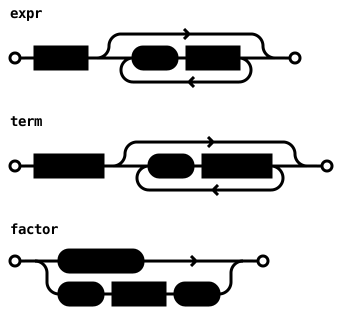
For larger grammars, --split puts each rule in its own file:
ts-bnf-tool railroad --split --output-dir diagrams/ toy.bnf
# writes diagrams/expr.svg, diagrams/term.svg, diagrams/factor.svg
# cross-rule links use relative pathsYou can also render just one rule if that is all you need: ts-bnf-tool railroad --rule expr toy.bnf.ts-bnf-tool railroad –rule expr toy.bnf
The split mode is particularly useful for publishing grammar documentation as a static site: each rule gets its own page, and the links between them just work. The BNF dialect’s own grammar has a railroad diagram generated this way.

The Big Picture: Rule Dependency Graphs
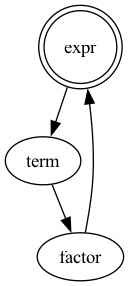
A railroad diagram shows the shape of one rule. A dependency graph shows how all the rules relate to each other — which rules call which, which ones are reachable from the entry point, and which ones are isolated dead ends.
Use the ts-bnf-tool graph command to produce this directed graph. By default, it generates a Graphviz DOT file, but if you have it installed, you can produce other formats.
# generate the toy.dot file
$ ts-bnf-tool graph toy.bnf > toy.dot
# check the generated file
$ cat toy.dot
digraph grammar {
  "expr" [shape=doublecircle];
  "expr" -> "term";
  "term" -> "factor";
  "factor" -> "expr";
}The start symbol (either the first production or the rule named by the %axiom directive) gets a double circle, to stand out. In the other hand, if a rule references a name that is never defined, that node appears in dashed style, and a warning goes to the standard error.
So, if you have Graphviz installed, just pass --format svg, --format pdf, or --format png and the tool executes dot for you:
ts-bnf-tool graph --format pdf -o toy-graph.pdf toy.bnfPDF and PNG always require -o since they produce binary output. If dot is not on your PATH the tool prints a clear error with the Graphviz install URL and exits non-zero.
Here is the graph produced by this command for the arithmetic expression toy language:
Mermaid output
If you want something you can paste into a GitHub README or a Markdown doc, --format mermaid emits a Mermaid flowchart:
# Generate the markdown file
$ ts-bnf-tool graph --format mermaid toy.bnf > toy.md
# Show the file contents
$ cat toy.md
graph TD
  expr_(["expr  ★"])
  factor_["factor"]
  term_["term"]

  expr_ --> term_
  term_ --> factor_
factor_ --> expr_The start symbol carries a ★ suffix; undefined references carry a ⚠. Given that Mermaid cannot quote node IDs, the tool appends a trailing underscore to each ID (expr_) and keeps the label clean. Rule names like end, style, and class — which are Mermaid flowchart keywords — remain safe this way.
Subgraph mode
For grammars with dozens of rules, --start <rule> restricts the output to the subgraph reachable from the named rule:
ts-bnf-tool graph --start expression big-grammar.bnfEverything that expression cannot reach is silently dropped, giving you a focused view of one slice of the grammar.
Reusing grammars: %include
As grammars grow, keeping everything in one file becomes unwieldy. 0.3.0 adds a %include directive that merges other BNF files into the current grammar. It is also useful if you have a small grammar for expressions and you want to reuse it in two distinct languages, that share that small dialect.
%include "expressions.bnf"
%include "statements.bnf"
%include "types.bnf"

program -> statement+ ;Paths are relative to the including file. Nested includes (A → B → C) work; circular includes (A → B → A) are detected and reported as an error. All directives from included files — %extras, %inline, %supertypes,%conflicts — are merged additively. A duplicate rule name across files produces a warning (last definition wins); a duplicate %axiom across files is an error.
Every subcommand that reads a grammar — convert, check, firsts, format, graph, railroad — operates on the fully-merged result. From the tool’s perspective, %include is transparent.
format, a command we talked in a previous post, has one extra trick: it inlines all %include directives and emits the merged grammar as a single canonical file, which is handy when you want to snapshot a multi-file grammar or submit it somewhere that expects a single file: ts-bnf-tool format main.bnf > merged.bnf
Cleaner Declarations: %axiom
Tree-sitter treats the first rule in grammar.js as the start symbol. Without %axiom, ts-bnf-tool mirrored this by converting the first rule in the BNF file. That means moving a rule to the top of the file changes its role, which is prone to mistakes. %axiom saves the day:
%axiom expr

top_level -> statement+ ;
expr      -> term ('+' term)* ;
term -> /[0-9]+/ ;convert silently emits expr first in grammar.js‘s rules: block, making it the tree-sitter start symbol, while the BNF file keeps its own declaration order. %axiom is also useful for debugging: temporarily redirect the entry point to a sub-rule without rearranging the whole file.
check enforces the obvious invariants: the named rule must exist, and %axiom may appear at most once per file (across all %include-d files, duplicate %axiom declarations are an error). The reachability check now exempts the axiom rule rather than the first-declared rule. format emits %axiom first among directives.
Other candy: rename, highlights and check
rename
ts-bnf-tool rename performs a safe, mechanical rename of one rule throughout the entire grammar — its definition, every reference in rule bodies, and every mention in directives — in a single pass:
ts-bnf-tool rename grammar.bnf term node      # preview on stdout
ts-bnf-tool rename -i grammar.bnf term node # rewrite in place (atomic)It exits non-zero if the source rule does not exist or the target name is already taken, making it safe to use in scripts.
highlights
ts-bnf-tool highlights generates a skeleton highlights.scm query file from a BNF grammar using naming-convention heuristics:
ts-bnf-tool highlights grammar.bnf -o queries/highlights.scmRules whose bodies contain no terminals are omitted (they are structural, not syntactic). Unrecognised rules get a ; TODO: @??? placeholder that you fill in. Pass --no-todos to suppress the placeholders entirely if you prefer a
minimal skeleton. This is now part of convert --generate behind the scenes.
check --summary
check now accepts --summary, which appends a compact metrics block after the diagnostics:
ts-bnf-tool check --summary grammar.bnf

Summary:
  Rules: 24 total, 8 leaf, 1 unreachable
  Terminals: 12 literals, 5 patterns
  Undefined references: 0
  Left-recursive rules: 0 direct, 0 mutual
FIRST-set sizes: min 1, max 9, avg 3.2The summary goes to stdout; diagnostics remain on standard error.
--json on check and firsts
Both check and firsts now accept --json to emit machine-readable output instead of plain text:
ts-bnf-tool check --json grammar.bnf
ts-bnf-tool check --json --summary grammar.bnf  # adds "summary": {...} key
ts-bnf-tool firsts --json grammar.bnfThis is useful for editor integrations, CI dashboards, or any tooling that consumes the diagnostics programmatically.
Documentation
The documentation has been restructured. The README is now a short overview; the per-subcommand reference lives in a set of tutorial chapters, and the whole thing is published as a static site at ambs.github.io/tree-sitter-bnf-tools.
The eight tutorial chapters cover everything from getting started to visualising a grammar, the new chapter that walks through both railroad and graph with the toy arithmetic grammar as a running example.
Summing Up
Version 0.3.0 is mostly about making grammars visible. railroad and graph turn a .bnf file into diagrams you can publish, share, or just stare at when you are trying to understand why your grammar does what it does. %include and %axiom handle the structural concerns that become painful once a grammar exceeds a screenful. rename, highlights, --summary, and --json fill gaps that users kept running into.
Install or upgrade: cargo install ts-bnf-tool
The full changelog is on GitHub. Full documentation at ambs.github.io/tree-sitter-bnf-tools.